
ApexGaming Since 2022
ApexGame Table Games Troubleshooting:
Login, Loading & Game Errors Fixed
Table games are the classic casino formats you'd find at a real table — Baccarat, Roulette, Blackjack, Sic Bo, and card games like Tongits — rebuilt as software you play solo, at your own pace, against a random number generator instead of a live dealer. On ApexGaming, table games sit alongside Live Casino, Slots, Fish Games, Arcade Games, and Sports Betting as one of the platform's core categories.
This ApexGame Table Games Troubleshooting guide covers two things: a quick look at what's available and which providers carry it, then a full walkthrough for the problems players actually run into — table games not loading, a game freezing mid-round, or a login error blocking access before you even reach the lobby.
What Table Games Are Available on ApexGaming
This matters most during peak hours. If a table is full, knowing which other provider carries the same game — and how that provider's version differs — gets you back into a game faster than refreshing the same table and waiting.













Card game classics
Baccarat, Speed Baccarat, Blackjack, and poker-style formats like Ultimate Texas Hold'emRoulette
European Roulette plus multiplier and lucky-draw variantsDice and fast-format games
Sic Bo, Dragon Tiger, and regional dice gamesFilipino card games
Tongits, Tongits Go, and Pusoy Go, built around rules Filipino players already know from offline playTable Game Providers on ApexGaming
Table games on ApexGaming aren't built by one studio. Multiple providers each supply their own library, and the game you're troubleshooting often depends on which provider is running it. Knowing the provider helps narrow down a fix — a JILI login error and a live-dealer connection issue don't have the same cause.








ApexGame Table Games Troubleshooting
This is the core of the guide. Below are the three problems players report most: table games not loading, a game freezing or not working mid-session, and login errors that block access entirely — including the JILI table games login error specifically.1. Table Games Not Loading
If a table game spins, freezes on a loading screen, or won't open at all, work through these in order: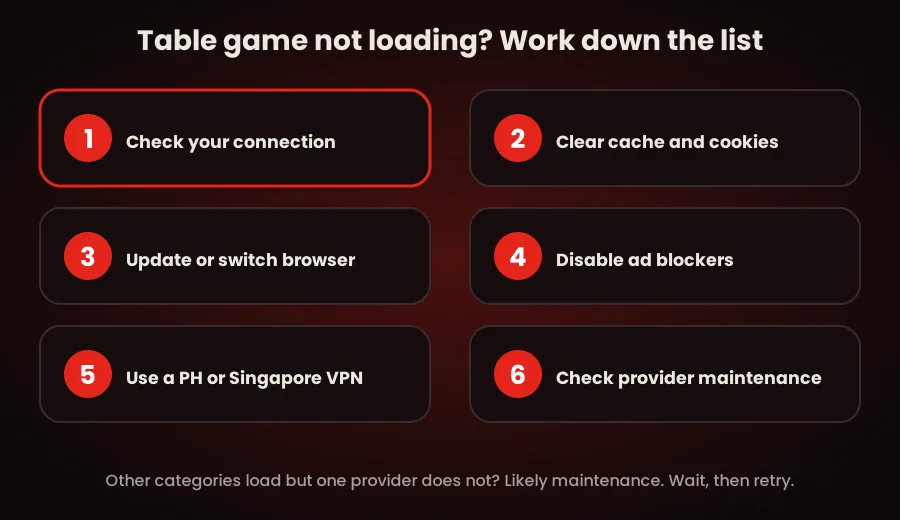
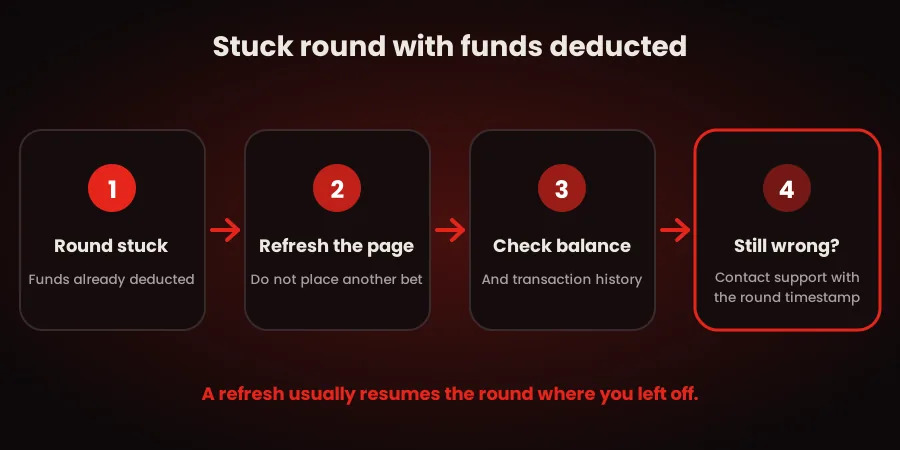
2. Table Game Not Working Mid-Round
A game that loads but freezes, lags, or doesn't register a bet mid-round usually points to a connection drop rather than an account issue.3. Login Errors Blocking Table Games Access
A login error stops you before you even reach the table games lobby. Most login errors fall into a few known categories: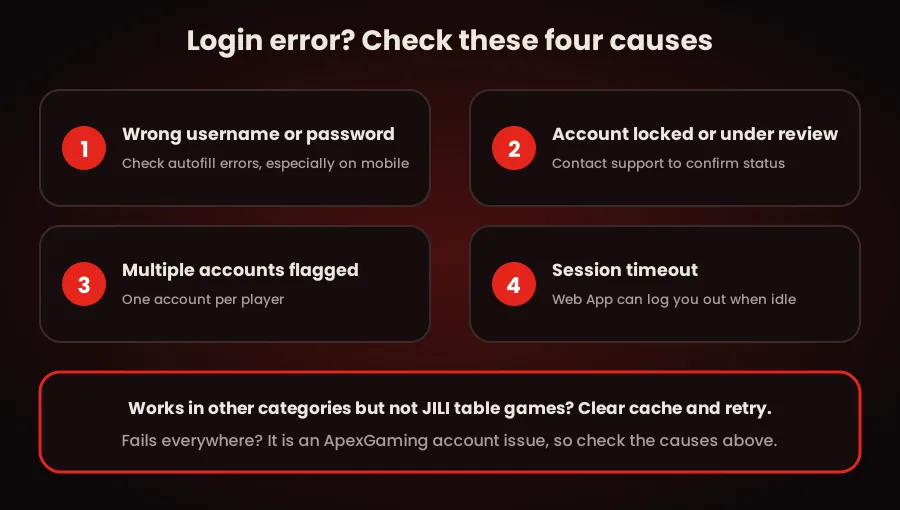
Because JILI carries the largest table game library, most login-error reports for table games mention JILI by name — but the error itself is almost always an ApexGaming account-level issue, not a JILI-specific one. If you can log into other ApexGaming categories (Slots, Fish Games) but not JILI table games specifically, clear cache and retry before assuming it's account-related. If the login error follows you across every category, it's an ApexGaming account issue — work through the account-level causes above.
When to Contact Support
Work through the steps above first. If the issue persists after a cache clear, connection check, and browser update, contact support directly rather than repeating the same fix:Frequently Asked Questions
Why do my ApexGaming table games keep loading slowly?
Slow loading is almost always connection-related. Table games stream continuously, so a switching or weak connection causes more visible lag than static pages do. Try a stable WiFi connection before assuming it’s a platform-wide issue.
Is a JILI table games login error different from a general ApexGaming login error?
Not usually. JILI has the largest table game library, so it gets reported most, but the underlying cause — password, account status, or session timeout — is almost always at the ApexGaming account level, not the provider level.
Do I need to verify my ID to fix a login error?
No. ApexGaming does not require ID for standard account access or withdrawals. Verification is only requested if your account is locked, restricted, or flagged for a violation.
Can I use a VPN to fix table games that won't load?
Yes, if you’re on a network that restricts gaming platforms. Connect to a PH or Singapore server first, then reload the game.
Responsible Gaming
ApexGaming is currently under PAGCOR monitoring. Table games move at whatever pace you set — with no live dealer and no betting timer, it's easy to play longer than planned without noticing. Set a session budget before you start, decide your stopping point in advance, and use your account's deposit, loss, and session time controls if you need them.
For responsible gaming support, contact PAGCOR directly:
ResponsibleGaming@pagcor.ph