
ApexGaming Technical Support
Find the Right Contact for Your Issue
Contact ApexGaming88
Most contact pages just list channels and leave you to guess. This one doesn't. ApexGaming Technical Support is built around one idea: the fastest fix depends on what's actually wrong, not which button you click first. Whether your deposit hasn't posted, a withdrawal is taking longer than expected, or a specific game isn't loading right, the section below matches the issue to the channel built to handle it. If you'd rather understand how ApexGaming works first — account structure, payment routing, PAGCOR monitoring — that's covered separately.
Match Your Issue to the Right Channel
Before you open a chat, figure out which of these your issue actually is. It saves a back-and-forth.Deposit Hasn't Posted
GCash and Maya deposits are meant to post instantly. If a deposit hasn't shown up after a few minutes, don't retry the payment. Screenshot the GCash or Maya confirmation screen first — it has the reference number support needs to trace the transaction. Send that through Telegram; it's the fastest route for anything payment-related.
- Screenshot of the GCash or Maya confirmation screen
- The reference number shown on that screen
Withdrawal Is Taking Too Long
Withdrawal delays usually come from one of three things: high request volume, scheduled system maintenance, or an account flag. Have your transaction reference number ready before you reach out — it's the single detail that lets support check your status without asking follow-up questions. There's no maximum withdrawal limit and no ID required for a standard request, so a delay almost always traces back to one of those three causes, not a hidden limit.
- Your transaction reference number
Game or Provider Issue
A frozen round, a game that won't load, or a result that looks off is a provider-side issue more often than an account issue. Note the exact game name and provider — for example, whether it's a JILI, PGSoft, Fa Chai, or JDB slot, or a live table from Evolution Gaming, Pragmatic Play, or one of the other live casino providers — before contacting support. That detail alone usually cuts resolution time in half.
- Exact game name and provider
- Screenshot of the frozen round, loading issue, error, or unexpected result
Account Locked or Restricted
Account verification is only required if your account gets locked, flagged for a withdrawal restriction, or shows a violation — not for everyday play. This is the most common reason players go looking for an ApexGaming contact for account issues in the first place. If it happens to you, contact support directly rather than creating a second account. Multiple accounts from the same player result in permanent withdrawal restriction and bonus cancellation, and that's not reversible through support once it's triggered.
- Your username
- A description or screenshot of the message or restriction you see
General Questions or Promo Terms
For anything that isn't urgent — a promo term you want clarified, a general platform question, a request for documentation — email is the better channel. It's not built for real-time replies, but it's the right place for anything that needs a written record.
- The promo name or your specific question
- Any relevant details or documentation
How Response Times Actually Work
There's no universal turnaround time across channels, because they're not built for the same purpose.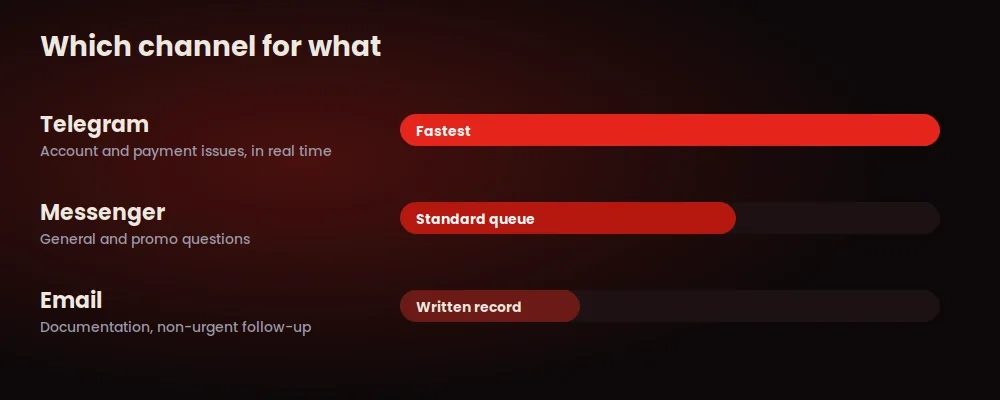
If you send the same issue through more than one channel at once, it doesn't speed things up. It usually slows things down, since two different people may end up working the same ticket without knowing it. Pick the channel that matches your issue, send the details once, and give the team a reasonable window to respond before following up.
Support Channels
Once you know which issue you have, here's where to take it.
Before You Reach Out
A few things worth knowing going in:


- Payment methods accepted: GCash, Maya, and Online Bank Transfer only. If you’re asked to pay another way to “resolve” an issue, that’s not ApexGaming support.
- Minimum deposit and withdrawal: ₱100. There’s no maximum withdrawal limit.
- One account per player. This isn’t just a rule — it protects your ability to withdraw. A second account, even one created to “start fresh,” puts both at risk.
- ApexGaming is currently under PAGCOR monitoring. Support can help with account and transaction issues, but responsible gaming concerns are handled separately (below)
What Support Can Help With
and What It Can't
A few things worth knowing going in:
If a channel or contact you're messaging offers to "speed things up" for a fee, or asks for your password, that's not ApexGaming Technical Support — the official channels never ask for your account password under any circumstance.