
Apex Gaming for Beginner
ApexGaming Registration Problems:
Form Rules and Fixes
Most ApexGaming registration problems come from small form mistakes. A password that breaks the rules, a phone number in the wrong format, or a code that never arrives can stop you at the last step. This guide lists the rules for every field and the fix for each problem. It also covers ApexGaming OTP problems, so you know what to check when the code does not show up.
ApexGaming has been running since 2022 and is currently under PAGCOR monitoring. If you only need the standard steps, use the step-by-step guide on apexgame88.net. Come back here if the form rejects your details or the verification does not go through.
The Registration Form at a Glance
The sign-up form shows the Apex Gaming88 logo and an English language option. It has six fields and a Submit button. Here are the rules the form shows:Login Name:
a-z and 0-9 only, 4 to 20 characters.Nickname:
the display name shown on the platform. The form shows no rules for it.Password:
letters and numbers, 8 to 15 characters.Confirm Password:
type the same password again.Phone Number:
+63 is pre-selected. The example shows 905 123 4567.E-mail:
a valid email address.ApexGaming Registration Problems by Form Field
The sign-up form shows the Apex Gaming88 logo and an English language option. It has six fields and a Submit button. Here are the rules the form shows:Your login name is rejected
The login name allows lowercase letters (a-z) and numbers (0-9) only. It must be 4 to 20 characters long. Spaces, dots, dashes, and other symbols will fail. Capital letters may also fail, so use lowercase to be safe. Pick a name you can remember. You cannot change it after you register.
Your password is rejected
The form asks for letters and numbers only, from 8 to 15 characters. Symbols like @ or ! are not on the list, so leave them out. This catches many people who use a password manager. Auto-generated passwords often run longer than 15 characters or include symbols. Type your own, or shorten the generated one. Then type it again in Confirm Password. The two must match. Do not reuse your GCash or Maya password.
Your phone number is rejected
The form starts with +63 selected. Enter your 10-digit mobile number after it. The example shows 905 123 4567, with no leading 0. If your number is 0905 123 4567, drop the first 0. Use a number that is active and can receive SMS, because the platform sends your code there.
Your email is rejected or not confirmed
Check for typing mistakes, such as a missing @ or a wrong ending like .con. Use an email address you can open right now. A confirmation message is sent to it after you submit. If the message does not arrive, look in your spam or junk folder.
The Submit button does nothing
First, check that every field is filled in and that both passwords match. Tap Submit once and wait. A slow connection can make the page look frozen. If it stays stuck, refresh the page and try again over Wi-Fi or mobile data.

ApexGaming OTP Problems: What to Do If the Code Does Not Arrive
After you submit, the platform sends a one-time PIN (OTP) by SMS to your number. It also sends a confirmation message to your email. Both steps must be done before the account is fully active. If the OTP does not arrive, work through this list: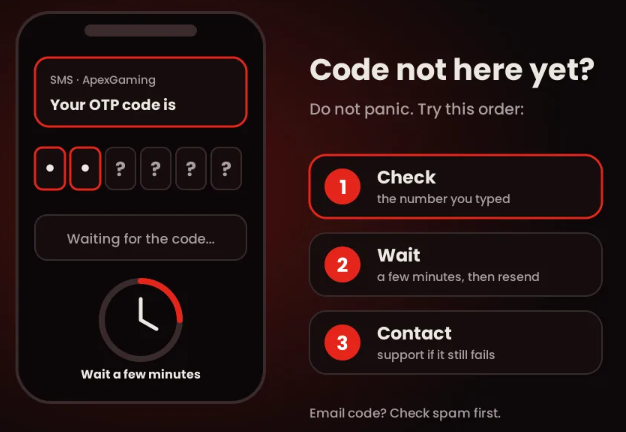
Device and Connection Fixes
If the page loads slowly, freezes, or will not take your input, try these fixes in order:Account Rules That Can Block You
One account per player.
Multiple accounts lead to a withdrawal restriction and bonus cancellation. If you registered before and forgot your login, do not create a new account. Use the password reset option or contact support.Age.
You must be 21 years old or above to register and play.Verification.
ID verification is requested only if your account is locked, a withdrawal restriction exists, or a violation is flagged. Standard withdrawals do not need ID.After You Register: First Deposit and Bonuses
Once your account is active, log in with your login name and password. Apex Gaming casino accepts three payment methods: GCash, Maya, and online bank transfer. These are the only three. The minimum deposit is ₱100.40% Welcome Boost
For new players on a first deposit. The minimum deposit is ₱100, the maximum qualifying deposit is ₱50,000, and the maximum bonus is ₱20,000. It carries a x5 turnover and applies to slots, fishing, and arcade games only.5% Maya Extra Bonus:
For Maya cash-ins. The minimum is ₱100 and the maximum qualifying deposit is ₱50,000. The maximum bonus is ₱2,500 per transaction, with a x5 turnover.
How to Contact Support
You can reach ApexGaming PH support through on-site Live Chat, Telegram, Facebook Messenger, or email. Use only the channels listed on the official site. When you ask for help, send a screenshot of the error and the time it happened. Hide your password in the screenshot. Never send your password in a message.
Telegram
the fastest channel for time-sensitive issues, including deposit or withdrawal disputes.
ApexGaming88 Support GroupApexGaming RegistrationFAQ
Why does my registration keep failing?
Most failures trace back to one of four things: the login name, the password, the phone format, or the email. Check each field against the rules in this guide, then submit again.
Can I change my login name later?
No. The login name is permanent once the account is created.
How do I type my phone number?
The form starts with +63 selected. Enter your 10-digit number without the leading 0, as in the example 905 123 4567.
What if the OTP never arrives?
Check the number, your signal, and your phone settings. Wait a few minutes and ask for a resend if the option shows. If it still fails, contact support.
Can I open a second account if I lost my login?
No. The rule is one account per player. Use the password reset option or contact support.
Are Apex88, ApexGaming88, and Apex Gaming 88 the same as ApexGaming?
Players also search for the brand as Apex Gaming, Apex88, ApexGaming88, and Apex Gaming 88. The sign-up form shows the Apex Gaming88 logo. Always check that your link comes from an official channel.
Who do I contact if registration fails?
Use Live Chat, Telegram, Facebook Messenger, or email. Send a screenshot of the error and the time it happened.
Responsible Gaming
Gambling should be entertainment, not a way to make money or recover losses. Set a budget before you deposit and stick to it. Do not chase losses. Take a break if you spend more or play longer than you planned.
ApexGaming is currently under PAGCOR monitoring. For help, visit PAGCOR's Responsible Gaming page or email ResponsibleGaming@pagcor.ph. You can also read our responsible gaming page for more.
ResponsibleGaming@pagcor.ph