



Never share your login name or password with anyone, even a friend.
Apex Gaming for Login
ApexGaming Login Problems:
How to Login and Fix Errors
Most ApexGaming login problems come from small mistakes, not broken accounts. A wrong letter, an extra space, or an old browser page is often the cause.
This page shows how to login to your ApexGame account step by step. Then it covers what to check when the login fails. You can fix most errors in a few minutes.
First
Before You Log In
First, make sure you already have an account. If you have not signed up yet, read the How to Register page first. Sign-up is free.
Next, know the difference between three things:
Login name
The username you made at sign-up. It uses letters (a-z) and numbers (0-9), 4 to 20 characters.
Nickname
The display name. You cannot use it to log in.
Also not used to log in.
Many Filipino players type their nickname by mistake, especially if they use the same name on other apps. Check this first if the form says your details are wrong.
Your password also has a set length. It is 8 to 15 characters, using letters and numbers. If the password you are typing is longer than 15 characters, it is not the one you made for this account.
Step by step
How to Login to Your ApexGame Account
The steps are the same on every device. Follow them in order.
1
Open the Official Website
Open Google Chrome or Safari. These two browsers work best with the platform. Go to the official ApexGaming link and tap the Login button. The login form will open.
Only use links from the official ApexGaming Facebook page or the official Telegram support. Copycat sites exist. Searching "apex online casino" can show pages that are not official, and a fake page can look like the real one.
2
Type Your Login Name
Enter your login name in the first field. Type it the way you wrote it at sign-up. Do not add a space before or after it.
3
Type Your Password
Enter your password in the second field. Tap the eye icon on the right side if you want to see what you typed. Tap it again to hide the password.
Passwords are case-sensitive. "Apex123" and "apex123" are not the same.
4
Choose Remember Me (Optional)
The form has a Remember Me toggle. When it is on, your login name is saved on that device. You will not need to type it next time.
Use it only on your own phone or computer. Never turn it on for a shared or public device.
5
Tap Login
Tap the Login button. If your details are right, your account opens and you can start playing slots, live casino, fishing games, and more.
Mobile
How to Login on Mobile
The ApexGaming PH login form on a phone is the same as on a computer. Open Chrome (Android) or Safari (iPhone), tap Login, and enter your details.
For quicker access, save the site to your home screen. It then opens like an app, with no app store needed. The Download App page explains how. The web app works on iOS 12.0 and up, and on Android 7.0 and up.
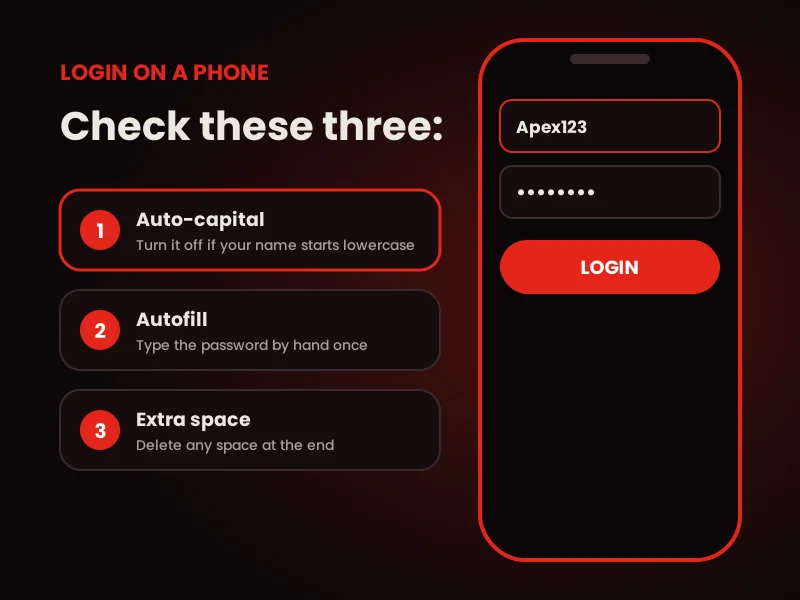
Phones add small problems that computers do not. Check these:
- Your keyboard may add a capital letter at the start. Turn off auto-capital if your login name starts with a small letter.
- Autofill may paste an old password. Type it by hand once to be sure.
- Your keyboard may add a space after a word. Delete any space at the end.
Troubleshooting
Fix ApexGaming Login Not Working:
Common Errors
Start with the quick table. Then read the detail below it.
What you see
Likely cause
What to do
"Wrong login name or password"
Typing mistake, or nickname used
Retype slowly. Use the eye icon to check.
Page will not load
Slow network or old browser data
Switch to Chrome or Safari. Clear cache.
Login button does nothing
Old page in memory
Refresh the page, or close and reopen the browser.
Site will not open at all
Restricted network
Try a VPN set to a Philippines or Singapore server.
Wrong Login Name or Password
This is the most common error. Stop and check each part before you try again.
Is it your login name, not your nickname? Is the password the right length? Did you turn on caps lock by mistake? Tap the eye icon and read what you typed.
Do not keep guessing. Too many random tries waste time. Use the password recovery steps instead.
The Page Is Not Loading
Switch to Google Chrome or Safari if you use another browser. Then clear your browser cache and reload the page. Old saved data can stop the form from working.
If the problem stays, check your internet. Move from mobile data to Wi-Fi, or the other way around, and try again.
The Site Is Blocked on Your Network
Some school, office, and shared networks block gaming sites. If the site will not open on one network but opens on another, the network is the cause.
In this case, connect a VPN to a Philippines or Singapore server first. Then open the login page again.
Your Details Look Right but Still Fail
You may be using details from a different site. Many players keep one login name for one platform and another for the next. Think about which one you used when you registered here.
If you are still stuck, contact support. The team can check your account status.
Recovery
Forgot Your Password or Login Name?
Do not create a new account. Each player may have only one account. Extra accounts lead to bonus cancellation and withdrawal limits.
- Forgot your password: use the Forgot Password page and follow the recovery steps.
- Forgot your login name: contact support. The team can help you recover it.
Stay safe
Keep Your Account Safe
A few habits protect your balance and your login:
Reminder: Your Account Security starts with you. Keep your login details provate and stay alert.
Support
Contact Support
Support is available daily. You can reach the team here: The login form also shows support icons for Viber, Telegram, Facebook, and WhatsApp. Whether it is an Apex casino login question or a deposit question, the team can help. When you write, include your login name. Never include your password. You can also read how the platform works on the How ApexGaming Works page.Got Questions? We've got you covered!
Frequently Asked Questions
What is my ApexGaming login name?
It is the username you chose when you registered. It uses letters (a-z) and numbers (0-9) and is 4 to 20 characters long. It is not your nickname or email.
Why does my ApexGaming login say the details are wrong?
The most common reasons are a nickname typed in place of the login name, a password with the wrong capital letters, or an extra space. Tap the eye icon to check your password before you try again.
Is the login different on mobile?
No. The form is the same on a phone and on a computer. Use Chrome or Safari for the best result.
Which browser should I use?
Google Chrome and Safari work best. If one does not work, try the other.
Can I stay logged in?
Turn on the Remember Me toggle before you tap Login. It saves your login name on that device. Use it on personal devices only.
What should I do if the page will not load?
Switch to Chrome or Safari, clear your cache, and reload. If you are on a school or office network, try another network or a VPN set to a Philippines or Singapore server.
Can I make a new account if I forgot my password?
No. One account per player is the rule. Use the Forgot Password page to get back in.
How do I know I am on the real ApexGaming site?
Use the links on the official ApexGaming Facebook page or the official Telegram support. Do not trust links from random ads, comments, or messages.
Who do I contact if nothing works?
Contact support on Telegram or Facebook Messenger. Support is available daily.
Responsible Gaming (Required)
ApexGaming is currently under PAGCOR monitoring. You must be 21 years old or above to play.
Play only with money you can afford to lose. Set a budget before you start and stick to it. If gaming starts to feel like a problem, take a break and ask for help.
For support, contact PAGCOR at ResponsibleGaming@pagcor.ph or visit the PAGCOR responsible gaming page. You can also read the 21+ Responsible Gaming page.